Plugin Version 4.0 and above
Setup
1) Upload and install the extension plugin zip file. Extensions are installed just like any other WordPress plugin. You can follow the same process used when uploading and installing the Custom Facebook Feed Pro plugin.
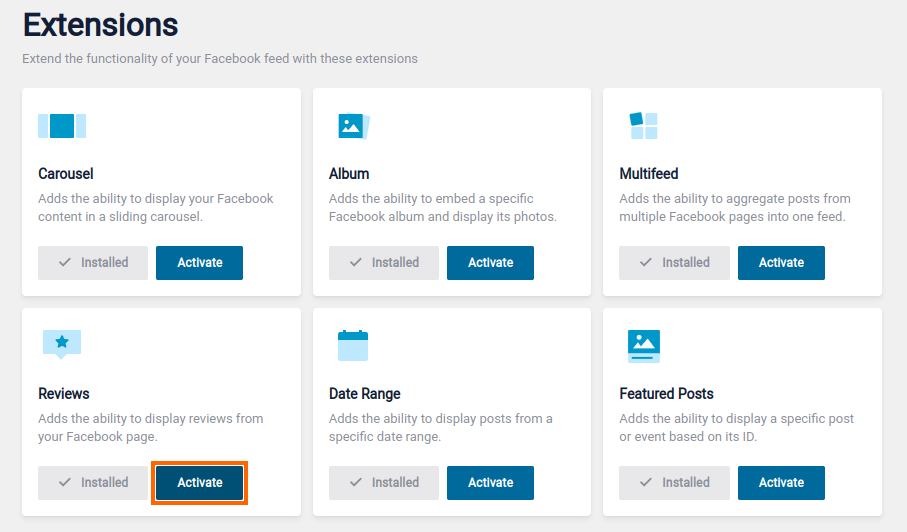
If you have the Smash license or All Access Bundle which include all our Facebook feed extensions, after installing and activating the Custom Facebook Feed Extensions plugin, you’ll also need to go to WordPress Dashboard > Facebook Feed > Extensions and activate the individual extensions that you would like to use:
2) Under Facebook Feed > All Feeds you can choose to create a new Feed. When selecting the Feed Type, select Reviews.
3) Add a new source, or select one you have previously added. The Source Access Token used for the Reviews Feed is the same as your normal Page Source if you have already added one.
4) Using the </> Embed button, get the correct shortcode and add it to your page where you want to display the Reviews feed.
Change an existing feed
If you want to change an existing feed to instead display reviews, go to Facebook Feed > All Feeds > Select edit for the relevant page > Settings > Feed Type > click Change, select Reviews, and Save. The Feed will now be updated in the location where you have previously added the shortcode.
Customization
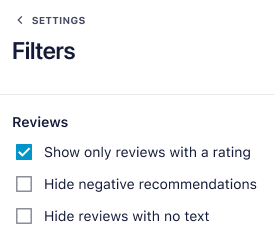
Once the extension is installed, you can edit the Reviews feed to change which type of reviews you want to display. To do this edit the feed you want to adjust, and go to Settings > Filters. Here, you will be able to toggle the following settings:
- Show only reviews with a rating
- Hide negative recommendations
- Hide reviews with no text
Displaying your total Facebook Page rating
Unfortunately, Facebook’s API doesn’t include the total star rating for your page, however, you can manually display this on your page by adding the following to your page above the shortcode:
5.0 <i class="fa fa-star"></i><i class="fa fa-star"></i><i class="fa fa-star"></i><i class="fa fa-star"></i><i class="fa fa-star"></i>
This will display a 5-star total rating. You can change the number of stars by editing the code. Be sure to copy and paste it into the “Text” tab of the page editor or use an HTML or Code Block, so that it is rendered as HTML.
Leave a Reply